
Moodle Resources
완료 조건
2. View and Edit Your User Profile
Creating a user profile in is an important aspect of participation in the online community.
Your profile is your online identity throughout the site. Creating or updating your profile is one of the first things you should do after you log in.
How to view and edit your profile
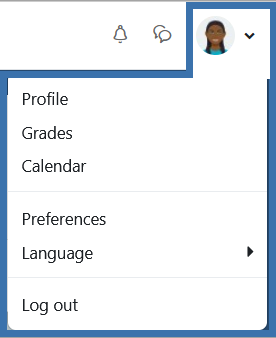 Click on your profile image or the small down arrow next to your image (top right) to open the user menu.
- In the drop-down menu, click on Profile.
- On your profile page, click on Edit profile. You can now update your profile.
Your profile is not course-specific. It will display for members of each course in which you are enrolled on this site.
Profiles are not public; they are visible only to people with accounts on this site.